Why write a post about logging?
As an automated tests developer, I often encounter a bit of confusion regarding two terms which might seem similar, but actually are quite different. Automation engineers sometimes mix "tests reporting" and "test application logging" on their implementation of testing framework. I don't blame them though, reporting and logging may sometimes have common elements which are to be reflected externally. On certain points of the tests building blocks, one might wonder- "where should I write this line of information? To the test's report, or maybe to the log?"
Testing may be a tedious task, but it is an inseparable part of any development routine. Giving a reliable and easy-to-read status picture of the system under test, is an essential requirement from every automated testing framework. Furthermore, decision making based on reliable testing results, should seamlessly blend into the application life-cycle management process. Assuming that the application's information to be reflected, is reliable, you still need to choose the right platform to expose it through. You wouldn't want business information on your implementation logs, and your manager wouldn't know what to do with exception information, presented on the test's report. The relevant information is to be presented to the right eyes.
Definition of Terms
Let's start with automation logging. Just like any regular, non-testing-related application, logging is writing technical information to a designated file (or to multiple files), during program execution. On each stage that the application is executing, there should be a line of log information, to trace problematic events later on, if required. The data on the logs includes information about the implementation of the software being executed. One can write to the logs things like methods calling, classes the flow uses, loops the application goes through, conditional branches, exceptions thrown, etc.
As tests developers, we usually would not place data regarding the business into the test logs, (later on, I'll explain why I chose to write- 'usually'). Information like: "Test xyz passed/failed", won't have any meaning and wouldn't help in any way, when you debug your automation code.
Automation tests reports, on the other hand, should include information of all AUT related tests/checks executed. The data reported is a business oriented info regarding the actual purpose of the execution (which is to test a portion of a product), but in a detailed manner. Most of the report is to include pass/fail statuses, and the dominated colors on it, should be green and red (preferably green of course).
There's no point in placing logical-implementation information, (such as classes used by the execution) on the test report, since it wouldn't say anything to the manager who receives the mail with the execution results. The automated tests are executed to test an application, therefor, test report is to include all data indicating the execution and outcome of the automated tests.
Figure_1. Here's a sketch representing the idea:
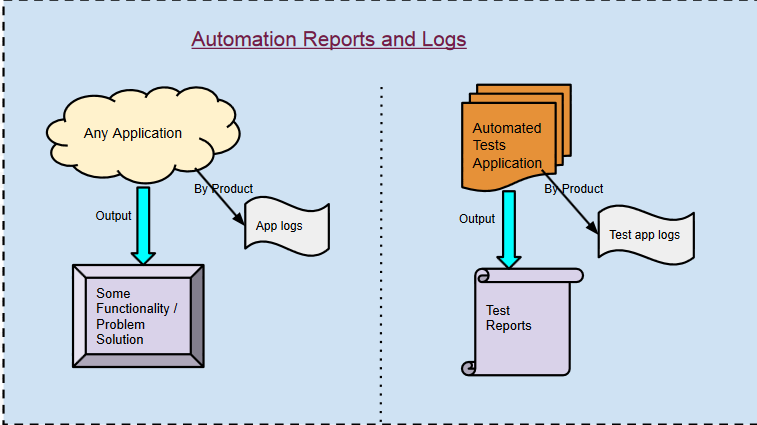 As seen on the figure_1 above (sorry for over simplifying :)), the result of executing any application is its goal. It could be any functionality intended, and it might be a solution to a problem. But with automated tests, the result of execution is the test report. The tests are executed in order to give us a reliable status-picture of the application / system under test, and the test report should present us this output. There's no other purpose to executing automated tests- it all comes down to executing test scenarios on the AUT, and reporting the outcome.
Logs on the other hand, are a by product of both test automation application, and any other app. These are aimed for the eyes of developers mainly (and also for the QA & support tears), but never intended to be seen by decision makers, since the logs contain technical data.
Figure_2. Which layer writes to the reports, and which one to the logs:

The opposite view- Do not split the data
There's an approach which recognizes that automated test logs, are only the interest of automation developers (and sometimes of a specific test developer), and therefor there's no need to split related data into two separate destination file types. The supporters of this view claim that as opposed to application logs, which can be analyzed by developers, testers and support engineers, test logs could easily be merged into the reports, since the information types of the tests and the application's actions (loops, conditions, methods, classes etc.) are linked.
When logs and reports are separated, You start troubleshoot a problem with the red label on the report. That would direct you to the implementation logs to track down the problem. One would need to locate the time and context with two data sources. This approach suggests putting the logs with the reports, or merge the reports with the logs so that you won't exhaust yourself going back and forth between the logs and reports, pinpointing a problem.
Continuous Integration solves the dilemma
Extending the limits of automation even further, continuous integration systems support common testing frameworks, and can determine the status of a build based on the success or failure results, reported by these frameworks (JUnit, TestNG etc). Though they were originally and mainly targeted unit tests, these well known and thoroughly debugged testing systems, might as well be leveraged for complete system / end-2-end tests. Executed tests information is thrown to the logs, where all exceptions / successes are seen on the CI tracking solution. If one insists on seeing reports as well, some CI systems offer APIs for any extension plug ins.
This basically solves our problem. With continuous integration, the discussion on test logs or reports, is not relevant. The main advantage of integrating end-to-end tests with CI systems, is that the decision on the build's status is taken out of the hands of humans (automation or not? :)). It is all automatic, hence requires reliable deployment procedure, and much more robust and well written tests. Just write all of your data to the logs, and if a problem occurs, the continuous integration mechanism would raise a failure flag, and point you to the error on the logs.
This basically solves our problem. With continuous integration, the discussion on test logs or reports, is not relevant. The main advantage of integrating end-to-end tests with CI systems, is that the decision on the build's status is taken out of the hands of humans (automation or not? :)). It is all automatic, hence requires reliable deployment procedure, and much more robust and well written tests. Just write all of your data to the logs, and if a problem occurs, the continuous integration mechanism would raise a failure flag, and point you to the error on the logs.
